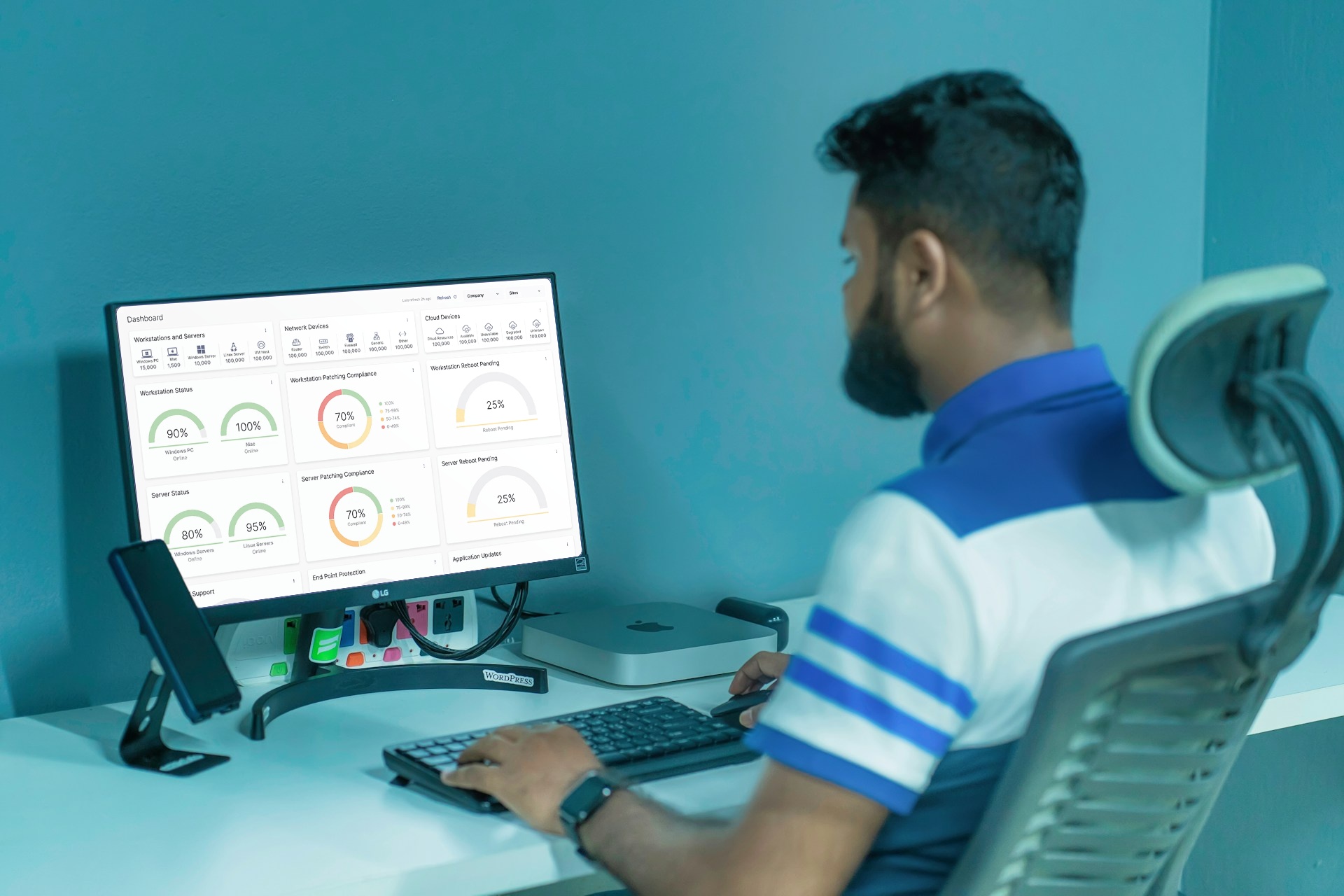
Remote monitoring and management (RMM) software lets IT teams and managed service providers monitor, manage, and secure client endpoints—servers, desktops, laptops, and mobile devices—from a single console. Lightweight agents on each device report health data and accept remote commands, letting one technician support hundreds of machines without visiting a single site.
What is remote monitoring and management? RMM defined
RMM stands for remote monitoring and management. It’s the category of IT management software that gives internal IT departments and managed service providers (MSPs) centralized, remote oversight of the endpoints they’re responsible for: think servers, workstations, laptops, mobile devices—and increasingly network gear like routers and firewalls.
The term does double duty. It describes the ongoing practice of keeping client or company systems healthy, and it describes the software that makes that practice possible: the RMM tool, or RMM platform. When someone asks “What is RMM software,” they’re usually asking about the second meaning: the agent, the console, and the automation layered on top of it.
RMM platforms provide centralized oversight of distributed systems, allow a service provider to automate routine maintenance, and enable proactive support instead of reactive site visits. RMM is a response to the break-fix model of IT support. a shift that’s still the core value proposition today.
How does RMM work?
Every RMM platform runs on the same agent-server model, regardless of vendor.
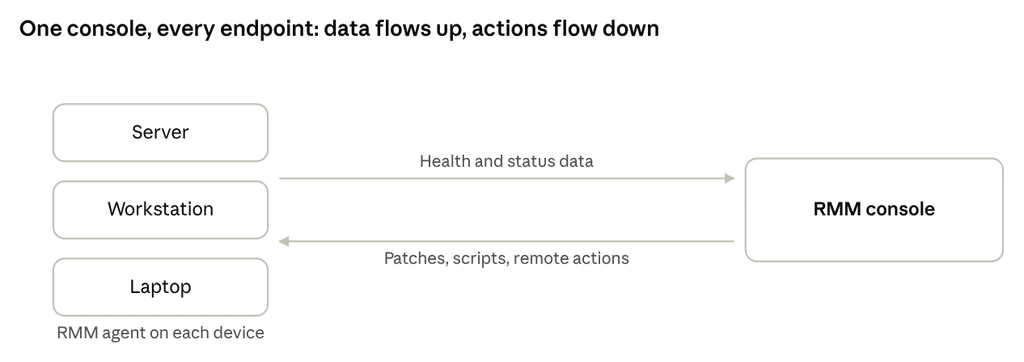
- Agent deployment. A small piece of software—the agent—is installed on every managed endpoint, usually via a mass deployment script so it rolls out quietly in the background.
- Data flows up. The agent continuously reports telemetry to a central management console: CPU and disk usage, running processes, patch status, security events, and uptime.
- Alerts fire on thresholds. When a metric crosses a defined line—low disk space, a stopped service, a failed backup—the console raises an alert, and escalation policies decide who gets notified and how urgently.
- Action flows down. From the same console, a technician (or an automation rule) can push a patch, run a script, remote into the machine, or apply a policy across an entire client’s fleet at once.
- Alerts become tickets. In most MSP stacks, alerts don’t stop at the console—they flow into a professional services automation (PSA) tool, where they’re logged, assigned, and billed as tickets, closing the loop from detection to resolution.
ConnectWise’s overview of RMM describes this same agent-to-console pipeline as the technical backbone of the category, and it’s a design every major platform, from NinjaOne to Atera to Datto, shares.
This is also where RMM meets the help desk. Once an alert becomes a ticket, it lands in the technician’s queue alongside the requests that end users raise directly, so a single service desk view covers both machine-detected and human-reported problems. In most MSP stacks the ticketing and help desk layer lives in the PSA rather than the RMM itself, but the two are tightly linked: the RMM is what turns a silent breach into a tracked and assignable job instead of something a technician only notices by chance.
Who uses an RMM tool?
RMM’s primary audience is managed service providers (MSPs), who use it as the operational backbone for delivering remote IT support to dozens or hundreds of client organizations from one dashboard. Without it, servicing more than a handful of clients with a small technician bench just doesn’t scale.
Two other groups rely on it heavily:
- Internal IT departments, especially at organizations with distributed offices or hybrid/remote workforces, use RMM to manage company-owned devices without a technician physically present.
- Managed security service providers (MSSPs), who layer RMM’s visibility and remote-access capabilities under a security-first service model. Our guide to how MSPs differ from MSSPs walks through where these roles overlap and where they diverge.
Key features of RMM software
Across vendors, the core feature set that defines “RMM tools” is remarkably consistent:
- Real-time monitoring: continuous tracking of endpoint health, performance, and availability, with anomaly detection.
- Patch management: automated distribution and installation of OS and application updates, often with approval workflows for regulated clients.
- Remote access and control: the ability to remote into a device to troubleshoot, without waiting on the end user.
- Automation and scripting: pre-built or custom scripts that resolve common issues (clearing disk space, restarting a service) with no technician involved.
- Alerting and escalation: configurable thresholds and notification rules that route the right issue to the right person.
- Asset and inventory management: a live record of every managed device, its specs, software, and warranty status.
- Reporting: performance, compliance, and SLA reports that both prove value to clients and flag where attention is needed.
- Endpoint security integration: native or bolted-on antivirus, EDR, and vulnerability scanning, which we cover in more depth below.
Benefits of RMM Platform
The case for RMM comes down to five outcomes:
- Proactive over reactive support. Issues get caught and often fixed before a user notices, instead of after they file a ticket.
- Scale. One technician can realistically oversee hundreds of endpoints instead of a handful, which is the entire economic model behind managed services.
- Cost efficiency. Fewer site visits, less emergency after-hours work, and more predictable technician workloads.
- Stronger security posture. Consistent patching, visibility into unmanaged software, and faster detection of anomalies all reduce attack surface.
- Reduced downtime. Automated remediation and early alerting shrink the window between “something broke” and “someone’s fixing it.”
RMM vs. adjacent tools
RMM sits next to a few tools it’s regularly confused with, or paired with.
Is RMM the same as remote desktop?
No. Remote desktop (or remote access) software, like AnyDesk or TeamViewer on their own, lets a technician view and control one device at a time. Remote control is one feature inside a full RMM platform, not the whole product.
RMM vs. PSA
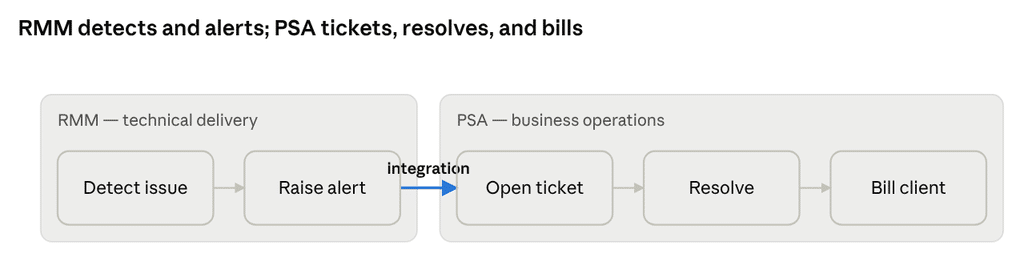
RMM and professional services automation (PSA) solve different problems and are usually run side by side. PSA software is built for project management, time tracking, billing, and resource utilization: the business side of running a services company, and is frequently integrated with RMM to connect technical delivery with invoicing.
| Dimension | RMM (Remote Monitoring & Management) | PSA (Professional Services Automation) |
| What it manages | The technical health of endpoints and networks | The business side of running a services company |
| Core jobs | Monitoring, patching, scripting, remote access, alerting | Ticketing, time tracking, billing, contracts, resource planning |
| Primary user | Technicians and NOC staff | Dispatchers, account managers, finance |
| Answers the question | “Is every client device healthy and secure?” | “Are we delivering and billing the work profitably?” |
| How they connect | Integrated so RMM alerts flow into PSA as trackable, billable tickets | |
RMM + EDR/Backup
Increasingly, RMM isn’t sold alone. Vendors bundle it with endpoint detection and response (EDR) and backup, since patching, monitoring, and threat detection all touch the same endpoint. This convergence is a defining trend of the category in 2026, covered in the “RMM in 2026” section below.
RMM use cases / Real-world applications
- Multi-client patch compliance: pushing critical OS patches to every device across every client, then reporting on which ones remain unpatched for audit or insurance purposes.
- After-hours monitoring: catching a failed backup job or a server running low on disk space at 2:00am, before it becomes a Monday-morning outage.
- Onboarding new clients: deploying agents across a newly won client’s fleet to get instant visibility into what you’ve just inherited.
- Remote troubleshooting for hybrid workforces: fixing a laptop issue for an employee working from home without a site visit.
- Asset lifecycle tracking: knowing which devices are approaching end-of-life or end-of-support before they become a liability.
Security considerations: RMM as a target, not just a tool
Picking an RMM comes down to five questions:
Pricing model: There are two main flavors here: per-technician and per-endpoint. Per-technician tends to be more predictable as your endpoint count grows; per-endpoint rewards a lean device count.
| Pricing model | Typical cost | Best fit | Watch out for |
| Per technician | ~$100–$200 / tech / month, unlimited endpoints | Growing MSPs with a high endpoint-to-tech ratio | Pricey if you have many techs but few devices |
| Per endpoint | ~$2–$5 / device / month | Lean device counts, or large books with volume discounts | Costs scale directly with every device you add |
Integrations: Does it connect cleanly to your PSA, documentation, and backup tools—or does it force a full stack migration?
Security depth: Native EDR, MFA on the console, granular role-based access, and audit logging, not just monitoring.
Platform coverage: Windows, macOS, Linux, mobile device management (MDM), and network gear, if you manage any of it.
Migration cost: Switching RMMs typically means weeks of overlap rewriting scripts and rebuilding monitoring policies, so factor that into any “should we switch” decision.
Deployment model (Cloud vs on-premise): Nearly all modern RMM platforms are Cloud-based (SaaS)—the vendor hosts the console, handles updates, and you reach it from a browser, which is why a technician can manage endpoints from anywhere. On-premise RMM, where you run the server on your own infrastructure, still exists for organizations with strict data-residency or compliance requirements, but it means you own the patching, uptime, and security of the RMM server itself. For most MSPs, Cloud is the default, whereas on-premise is the deliberate exception.
MSPs under roughly 50 managed endpoints often get more value from a lean, all-in-one per-technician platform; larger books of business tend to shift toward per-endpoint pricing once volume discounts kick in.
RMM in 2027: AI and platform consolidation
Two shifts define where RMM is headed in 2027. First, AI is moving the category from reactive to predictive: platforms increasingly flag anomalies before a threshold is even breached and auto-remediate common issues, rather than just alerting a human after the fact. Second, the market is consolidating: RMM, PSA, EDR, and backup are converging into single platforms instead of four separate logins, reducing tool sprawl and closing the gaps that appear when security tools don’t talk to each other.
That consolidation mirrors a broader pattern across the MSP industry: clients increasingly expect outcomes and security assurances, not just “managed endpoints and routers,” a shift our recent look at what rising IT spend means for MSPs explores in more detail. It’s also part of why AI and automation now sit at the center of MSP planning conversations, as covered in our piece on future-proofing MSP businesses.
FAQ
RMM stands for remote monitoring and management, a category of software that lets IT teams and MSPs monitor, patch, and remotely control endpoints from one central console.
No. Remote desktop is one feature inside RMM. A full RMM platform also monitors device health continuously, automates patching, runs scripts across a fleet, and alerts on thresholds, capabilities a standalone remote-access tool doesn’t have.
RMM monitors and manages the technical health of endpoints. PSA (professional services automation) manages the business side: tickets, time tracking, and billing. Most MSPs run both, often integrated so alerts from RMM automatically become billable tickets in PSA.
Once an MSP is managing more than roughly 50 endpoints, manual, one-off remote support stops scaling and RMM becomes close to essential. Below that threshold, some very small shops get by with basic remote-access tools, but most outgrow that quickly.
Pricing generally falls into two models: per-technician, typically $100–$200 per month with unlimited endpoints, or per-endpoint, typically $2–$5 per device per month. Which is cheaper depends entirely on your ratio of technicians to managed devices.
RMM software is a legitimate, widely-used management tool, but its high privileges and remote-access capability also make it a known target. CISA and other authorities have documented threat actors abusing legitimate RMM tools for persistence inside compromised networks. Mitigating this means enforcing MFA on the console, restricting who can push scripts or install agents, and pairing RMM with EDR and strong identity controls rather than treating it as a security tool on its own.
An RMM agent is the lightweight software installed on each managed device. It continuously reports telemetry (health, performance, and security data) back to the central console and receives commands (patches, scripts, remote sessions) from it.